How Are Passwords Cracked? Techniques, Tools, and How to Stay Safe
You probably have somewhere between 10 and 100 online accounts. Email, Instagram, school portals, bank apps, gaming platforms, streaming services. Each one is protected by a password. And unless you're one of the rare, disciplined few, at least some of those passwords are reused, or embarrassingly simple, or both.
Here's the uncomfortable truth: hackers don't need to be geniuses to get into your accounts. Most of the time, they don't even need to be technically sophisticated. The techniques used to crack passwords range from computationally brutal to socially clever — and understanding each one is your first line of defence.
This guide covers every major method attackers use, how they actually work in practice, and — most importantly — what you can do right now to make yourself a much harder target. We'll also touch on how AI is changing this game, because the same tools reshaping industries are being weaponised by attackers too.
Why Your Password Is Worth Stealing
Before we get into the how, let's understand the why. What does an attacker actually gain from your password?
Financial accounts are the obvious target — direct access to money. But the less obvious targets are often more valuable. Your email account is a master key: with access to your email, an attacker can request password resets for every other account you own. Your social media accounts can be used to scam your contacts or spread malware. Your school or work login can give access to internal systems, confidential data, or sensitive communications.
Stolen credentials are also a commodity. Databases of breached usernames and passwords are bought and sold on dark web marketplaces. Your compromised Netflix login might get bundled with a million others and sold for pennies — then used in automated attacks against banking sites, because a shocking number of people use the same password everywhere.
This is why password security is not a niche technical concern. It is personal safety infrastructure. Let's look at exactly how attackers get in.
Attack Method 1: Brute Force and Dictionary Attacks
This is the most straightforward technique and, paradoxically, one of the most effective against weak passwords.
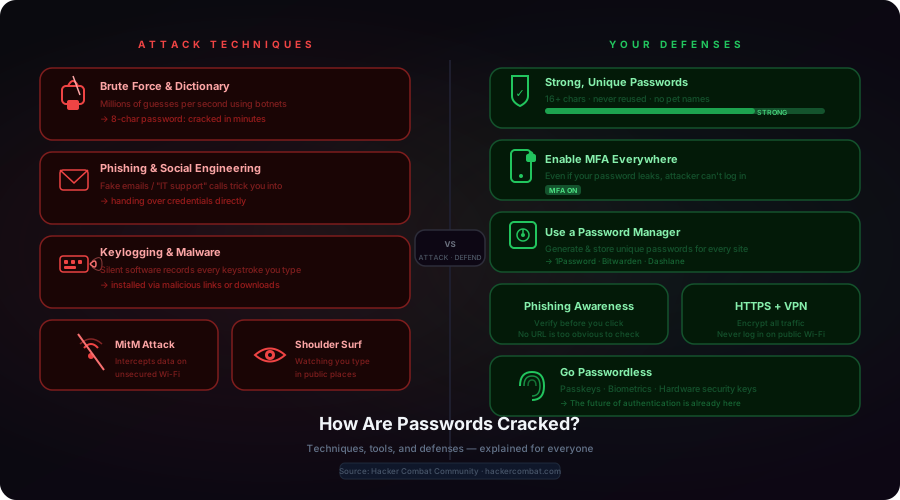
A brute force attack works by trying every possible combination of characters until the correct password is found. An attacker sets a program running against a target — a login page, a downloaded password hash, an encrypted file — and it starts guessing. a, b, c... aa,ab... all the way through every permutation.
This sounds slow. It is not. Modern hardware can test billions of guesses per second. A password of 6 characters using only lowercase letters has about 300 million possible combinations — less than a second's work for a decent GPU. An 8-character password with numbers and lowercase is about 218 trillion combinations, crackable in a few hours. Add uppercase and symbols, and that jumps dramatically — but still not to "impossible." A 12-character random password with mixed characters starts to become genuinely hard to brute force in a reasonable timeframe.
The smarter version is a dictionary attack: instead of trying every combination, attackers use a list of common passwords, real words, and previously breached passwords. Lists like "RockYou" — a dataset of 32 million real passwords leaked in 2009 — are freely available and tried first in virtually every attack. If your password is "iloveyou," "summer2023," or "Qwerty123," it's on the list.
Attackers also use hybrid attacks: take real words, add numbers or symbols at the end, substitute letters with numbers (a→4, e→3, o→0). If you've made your password "P@ssw0rd!" thinking you're clever, you're not — that pattern is well understood and on every wordlist.
Attack Method 2: Phishing and Social Engineering
Here's where it gets interesting. You don't need to crack a password if you can just trick someone into giving it to you.
Phishing is the practice of impersonating a trustworthy entity to steal credentials. The classic form is an email that looks exactly like a message from your bank, school, or a service you use. "Your account has been suspended — click here to verify your details." The link goes to a page that looks identical to the real login page. You type your username and password. They go directly to the attacker.
Modern phishing has become sophisticated. Spear phishing targets specific individuals using personal information — your name, your employer, a recent transaction — gathered from social media and public records. A message that says "Hi [your actual name], we noticed unusual activity on your [bank you actually use] account linked to your [real email] address" is alarmingly convincing.
Pretexting is a related technique. An attacker calls your company's help desk pretending to be a frantic employee locked out of their account. Or they call you pretending to be from IT support, saying they need your login to "fix a critical issue." Persuasive storytelling, urgency, and the exploitation of trust can bypass even the most sophisticated technical security system. The human layer is always the weakest link.
This is why social engineering is consistently listed as the most successful attack vector in cybersecurity reports. It bypasses firewalls, intrusion detection systems, and password policies entirely. It targets the person, not the system.
Attack Method 3: Keylogging and Malware
Keyloggers are software (or occasionally hardware) that silently record every keystroke on an infected device and transmit the data to an attacker. Everything you type — passwords, messages, card numbers — becomes visible to whoever deployed the logger.
Keyloggers typically reach your device through phishing emails, malicious downloads, infected USB drives, or compromised websites. Once installed, they are often nearly invisible — running in the background, consuming minimal resources, never announcing themselves. Some are sophisticated enough to take periodic screenshots, capture clipboard contents, or record audio.
If you've clicked a sketchy link recently, downloaded a "cracked" version of paid software, or opened an unexpected email attachment, there is a non-trivial chance a keylogger touched your system at some point. Most antivirus software catches common versions — but targeted, custom-built loggers often slip through.
Related malware types include credential stealers — programs that specifically target the stored passwords in browsers and password manager apps, extracting them from memory or saved files. Modern browsers that offer to "save your password" store them in encrypted form, but the encryption can be bypassed by malware running with the same user privileges as the browser itself.
Attack Method 4: Interception (Man-in-the-Middle)
When you send your password to a website, it travels over the internet. If that journey isn't properly encrypted, someone positioned in the right place on the network can intercept it.
A Man-in-the-Middle (MitM) attack works by inserting the attacker between you and the service you're connecting to. On an open, unsecured Wi-Fi network — in a coffee shop, airport, hotel lobby — this is surprisingly straightforward. The attacker sets up a malicious hotspot with a plausible name ("Airport_Free_WiFi"), you connect thinking it's legitimate, and all your traffic passes through their device.
SSL stripping is a more targeted variant: the attacker forces your connection from secure HTTPS down to unencrypted HTTP. If a site doesn't implement strict security headers (HSTS), and you connect through a compromised network, an attacker can silently downgrade your connection and read everything — including credentials submitted on login forms.
Packet sniffing tools like Wireshark can capture raw network traffic. On an unencrypted network, passwords and session tokens often travel in plain text, readable by anyone with the right tools. This is why the "only connect to HTTPS sites" advice actually matters.
Attack Method 5: Database Breaches and Credential Stuffing
This one doesn't require attacking you directly at all.
Every major online service stores user credentials in a database. When that database gets breached — and breaches happen constantly, at companies large and small — the attackers obtain a file containing millions of username/password combinations. Even if passwords are hashed (converted to a fixed-length string using a cryptographic function), weak hashing algorithms can be reversed or brute-forced offline.
Have I Been Pwned (haveibeenpwned.com) is a free service that lets you check whether your email address has appeared in a known breach. As of 2024, it contained over 12 billion breached accounts. Yours might be in there.
Once attackers have a list of valid credentials, they try credential stuffing: taking username/password pairs from one breach and automatically trying them on other sites. If you used the same password on the gaming forum that was breached five years ago as you use on your bank account today, that connection becomes the attacker's point of entry.
This is why "never reuse passwords" is the single most impactful password advice anyone can give you. A breach at any one service only compromises that service — unless you've reused the password, in which case it compromises everything.
Attack Method 6: Stealing Passwords the Low-Tech Way
Not all password theft involves sophisticated software. Sometimes the most effective methods are embarrassingly simple.
Shoulder surfing is exactly what it sounds like: someone watches you type your password. In a coffee shop, library, train, or open office, glancing at someone's screen or keyboard while they log in is a trivial way to capture a credential. Attackers can also use binoculars, hidden cameras, or simply position themselves in high-traffic areas where people regularly log into devices. It requires zero technical skill and has a reasonable success rate in public environments.
Physical access attacks involve finding passwords written down — on sticky notes on a monitor, in a notebook left on a desk, in a printed document — or accessing an unattended computer where accounts are still logged in. Studies consistently show that a surprising percentage of employees write passwords on physical paper. If you've ever written your WiFi password on a sticky note and left it somewhere visible, you've created a physical security vulnerability.
Manual guessing uses knowledge about a target. Birthdays, pet names, sports teams, favourite movies — all gleaned from social media profiles. An attacker who has spent 20 minutes on your Instagram can make surprisingly accurate guesses. "Jordan123" (favourite basketball player), "Luna2018" (your cat's name and adoption year), "Chelsea!" (football team) are all patterns attackers try immediately.
The AI Angle: Attacks Are Getting Smarter
This is worth understanding because it changes the threat landscape. AI is transforming how businesses operate — but the same tools are being used offensively.
AI-assisted password cracking uses machine learning to generate smarter password guesses. Instead of trying random combinations or generic wordlists, models trained on real leaked password datasets can predict the most statistically likely passwords for a target, weighting towards patterns humans actually use. A 2023 study found an AI tool called PassGAN could crack 51% of common passwords in under a minute and 71% in under a day.
AI-powered phishing is more immediately dangerous. Large language models can generate highly personalised, grammatically perfect phishing emails at scale — eliminating the spelling mistakes that used to be a reliable red flag. They can scrape your LinkedIn, social media, and public profiles to craft messages that reference your real colleagues, your actual employer, your recent projects. The "this email has typos so it must be a scam" heuristic is becoming obsolete.
Deepfake voice phishing (vishing) takes it further: an AI model trained on a few seconds of someone's voice can generate convincing audio of that person saying anything. Attackers have used AI-generated voices of executives to instruct finance teams to authorise fraudulent wire transfers. The "phone your boss to verify" safety check still works — but the threat is evolving.
How Hashed Passwords Work (And Why They Still Get Cracked)
When a website stores your password, it shouldn't store the actual string you typed. Instead, it should run it through a hashing function— a mathematical operation that converts your password into a fixed-length string that can't be reversed.
For example, the password "hunter2" run through the SHA-256 algorithm produces: f52fbd32b2b3b86ff88ef6c490628285f482af15ddcb29541f94bcf526a3f6c7. There's no mathematical way to reverse this — you can't get "hunter2" back from the hash. In theory.
In practice, attackers use rainbow tables — pre-computed dictionaries of millions of common passwords and their resulting hashes. If your hash matches an entry in the table, they have your password instantly. They also run brute force attacks directly against stolen hash databases, since offline cracking (against a file on your own machine) removes login rate limits entirely.
Good password storage uses salting — appending a random value to each password before hashing, so identical passwords produce different hashes and rainbow tables become useless — and modern, slow hashing algorithms like bcrypt or Argon2 that make each guess computationally expensive. When a service gets breached, the quality of their password hashing determines how long those passwords stay secure after the breach.
Your Defence Playbook: What to Actually Do
Understanding attacks is useful. Acting on them is what matters. Here's the honest, prioritised list of what you should do — ordered by impact:
1. Use a Password Manager — This Is Non-Negotiable
The fundamental problem with password security is the memory limitation: humans cannot remember 50 unique, complex passwords. So they reuse them. Password managers solve this by generating and remembering a different strong password for every site, while you only need to remember one master password.
Good options: Bitwarden (free, open source, excellent), 1Password (polished, paid), Dashlane. Most browsers also have built-in password managers that are better than nothing, though dedicated apps are more secure and cross-device.
After setting this up, update your most important accounts (email, banking, work) with generated 20+ character passwords. Those accounts should each have a unique password that you don't actually know — the manager knows it.
2. Enable Multi-Factor Authentication (MFA) on Every Important Account
MFA adds a second verification step — a code from an app, a text message, a hardware key — that an attacker needs in addition to your password. Even if your password is completely compromised, MFA stops the attack dead.
The order of preference: hardware security keys (like YubiKey) are most secure. Authenticator apps (Google Authenticator, Authy) are excellent. SMS codes are better than nothing but can be bypassed by SIM-swapping. Enable the strongest MFA option available on each service.
Priority order: email account first (it's your master key), then banking, then work accounts, then everything else.
3. Make Your Passwords Actually Strong
If you're generating passwords with a manager, they'll be strong by default. If you're choosing passwords manually: length matters more than complexity. A 16-character random string is vastly more secure than an 8-character string with numbers and symbols. Passphrases — four or five random, unrelated words — are both memorable and strong: "correct horse battery staple" (famously demonstrated in xkcd) is harder to crack than "Tr0ub4dor&3".
Hard rules: never use personal information (pet names, birthdays, addresses). Never use common substitutions (@ for a, 0 for o). Never reuse passwords. Never use anything that appears in a dictionary in any language.
4. Treat Phishing Like Traffic Safety
You probably know not to run red lights — not because you consciously think about it every time, but because the habit is automatic. Password phishing defence should work the same way.
Build these automatic behaviours: Never click a link in an email asking you to log in — go directly to the site instead. Verify the URL before entering any credentials (look for the exact domain, not a lookalike). If someone claiming to be IT support contacts you asking for credentials, hang up and call IT back on a number you find yourself. No legitimate service will ever ask for your password — not IT, not your bank, not anyone.
5. Keep Devices and Software Updated
Software updates patch the vulnerabilities that malware exploits to get onto your device in the first place. Running an out-of-date operating system or browser is like leaving a known unlocked window in an otherwise secure building. Enable auto-updates. Keep your antivirus current. This removes the attack surface that keyloggers and credential stealers need.
6. Use Encrypted Connections — Always
Only submit passwords on HTTPS sites (the padlock in the browser bar). Avoid logging into important accounts on public Wi-Fi. If you must use public Wi-Fi, use a VPN (Virtual Private Network), which encrypts all your traffic between your device and the VPN server, preventing local interception.
7. Monitor Your Accounts and Breach Databases
Visit haveibeenpwned.com now and check your email addresses. If you appear in a breach, change the password for that service immediately and update any other accounts that used the same password. Set up the free notification service to alert you when your email appears in future breaches.
Review login history for your most important accounts (Google, Apple, and most major services show recent sign-in activity). Unfamiliar locations or devices are a red flag worth investigating.
8. Shield Your Keyboard in Public
It sounds old-fashioned but it matters. When typing passwords in public places — ATMs, coffee shops, open offices — physically shield your keyboard with your body. Be aware of who has line-of-sight to your screen. Shoulder surfing requires no technology and no skill. It just requires opportunity.
The Passwordless Future Is Closer Than You Think
Here's something that might actually be good news: the password, as a concept, is being phased out. Passkeys — the standard supported by Apple, Google, Microsoft, and major browsers — replace passwords with cryptographic keys stored on your device, unlocked by biometrics (your fingerprint or face) or a PIN. There's no password to steal, no password to phish, no password hash to crack. The entire attack surface we've covered in this post becomes moot.
Passkeys are already available on Google, Apple, Microsoft, GitHub, PayPal, Amazon, and hundreds of other major services. When you see the option to set up a passkey, take it. You're opting into a fundamentally more secure authentication model that doesn't require you to memorise or manage anything.
Similarly, hardware security keys (YubiKey and similar) provide phishing-resistant MFA that can't be bypassed by fake login pages — because they cryptographically verify the site's identity before responding. If you work in a high-risk environment or have accounts worth targeting, a $25 hardware key is the best security investment you can make.
A Note on AI-Assisted Defence
Just as AI is being used offensively, it's also powering the next generation of defensive tools. Anomaly detection systems flag unusual login patterns in real time. AI-powered email filters catch increasingly sophisticated phishing attempts. Behavioural authentication models can tell whether it's really you typing — based on patterns like keystroke timing and mouse movement — and flag sessions that don't match your profile.
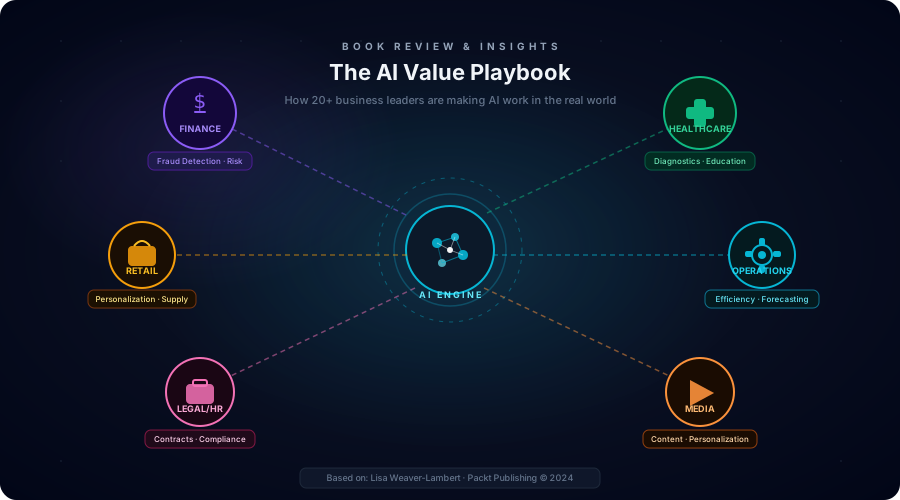
This is exactly the dynamic covered in our post on The AI Value Playbook — the same technology being used to transform businesses is simultaneously raising the stakes in the security arms race. Understanding both sides of that equation is increasingly important.
The Connection to Bigger Digital Change
Password security doesn't exist in isolation. As organisations go through digital transformation — moving more systems online, integrating more tools, expanding access — the attack surface grows proportionally. Every new cloud service is a potential entry point. Every new employee device is a potential endpoint compromise. The companies that handle transformation well are the ones that treat security as a first-class concern from the start, not an afterthought bolted on at the end.
For developers: the tools and habits you build early matter enormously. Moving fast with AI assistance is a massive productivity advantage — but shipping insecure code at speed is just shipping insecure code faster. Security-aware development habits (input validation, proper credential storage, dependency hygiene) are not in conflict with speed. They're what separates professional software from amateur work.
Quick Reference: The Full Attack/Defence Map
| Attack | How It Works | Your Defence |
|---|---|---|
| Brute Force | Tries billions of guesses per second | 16+ char passwords · password manager |
| Dictionary Attack | Uses lists of common/breached passwords | Never use real words or patterns |
| Phishing | Fake login pages and emails | Verify URLs · never click email login links |
| Social Engineering | Tricks you into handing over credentials | Verify identity · no legit org asks for passwords |
| Keylogging | Silently records every keystroke | Antivirus · avoid sketchy downloads · updates |
| MitM / Interception | Intercepts data on unsecured networks | HTTPS only · VPN on public Wi-Fi |
| Credential Stuffing | Tests breached passwords on other sites | Unique password per site · check haveibeenpwned.com |
| Shoulder Surfing | Watches you type in public | Shield your keyboard · screen privacy filters |
| Database Breach | Service's database gets stolen | MFA everywhere · unique passwords · breach alerts |
The Honest Bottom Line
You will never eliminate the risk entirely. Services you trust will get breached. Attackers will get more sophisticated. AI will make some of these attacks faster and more convincing.
But here's the thing about security: you don't need to be perfectly safe. You need to be a harder target than most. Attackers are opportunistic. They run automated tools against millions of accounts simultaneously, looking for the weakest links. If your accounts have unique, strong passwords and MFA enabled, the vast majority of automated attacks simply move on to an easier target.
The three things that will protect you from the majority of threats:
- A password manager (unique passwords everywhere)
- MFA on every important account
- Scepticism about unexpected requests for credentials
That's it. Do those three things and you've addressed the majority of the attack surface. Everything else in this post is building on that foundation.
Start today. It takes an hour to set up a password manager and enable MFA on your most important accounts. That hour might be the most valuable security investment you ever make.
Related Articles