Cloud Cost Optimization Strategies for the AI Age
Moving to the cloud was supposed to save money. And for many companies, it has — at first. But somewhere along the way, the cloud bill starts climbing. A new service here, a few extra servers there, some storage that nobody is quite sure is still needed. Before long, the monthly invoice is significantly higher than anyone expected, and nobody can fully explain why.
This is one of the most common problems in technology today. Research consistently shows that companies waste between 30% and 35% of their cloud spend on resources they do not actually need. For a business spending $100,000 a month on cloud services, that is $30,000 to $35,000 going straight down the drain every single month.
The good news is that cloud cost optimisation is not complicated. It does not require a team of specialists or expensive tools. It requires understanding how cloud pricing works, knowing where to look for waste, and making a handful of smart decisions. This guide will walk you through exactly how to do that.
First, Understand How Cloud Pricing Works
Before you can optimise your cloud costs, you need to understand what you are actually paying for. Cloud providers like Amazon Web Services (AWS), Google Cloud, and Microsoft Azure all charge in broadly similar ways, even though the specific details differ.
At the most basic level, you pay for compute (the processing power running your applications), storage (the space where your data lives), and data transfer (moving data in and out of the cloud). On top of these three fundamentals, there are dozens of additional services — databases, machine learning tools, security services, monitoring tools — each with their own pricing model.
The default pricing model for most cloud services is called on-demandpricing. This means you pay for exactly what you use, by the hour or even by the second, with no long-term commitment. On-demand pricing is convenient and flexible, but it is also the most expensive way to use the cloud. It is designed for unpredictable workloads and short-term needs — not for the steady, predictable workloads that most businesses actually have.
Understanding this distinction — between on-demand pricing and the alternatives — is the foundation of cloud cost optimisation. Most of the strategies in this guide are about moving away from on-demand pricing where it makes sense to do so.
Strategy #1: Right-Size Your Resources
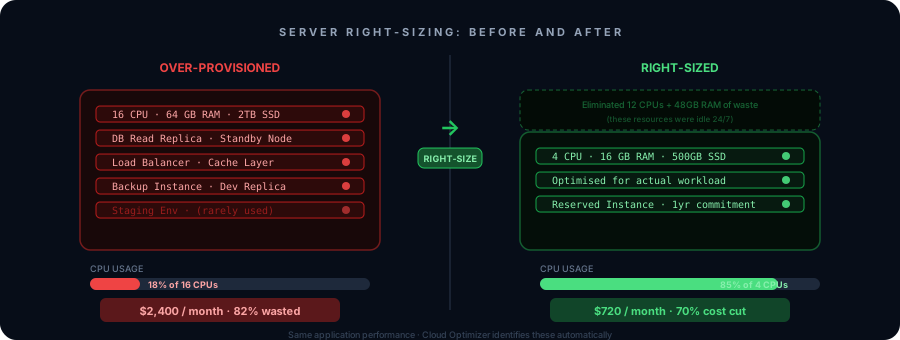
When companies first move to the cloud, they tend to over-provision. This means they choose servers and databases that are bigger and more powerful than they actually need, because they are worried about performance and do not want to risk running out of capacity. This is understandable — but it is expensive.
Right-sizing is the process of matching your cloud resources to your actual usage. It means looking at what you have provisioned and comparing it to what you are actually using, then downsizing where there is a significant gap.
Here is a simple example. Imagine you have a server that you provisioned with 16 CPUs and 64GB of memory. When you look at the monitoring data, you see that it is typically using 3 CPUs and 12GB of memory. You are paying for four times more capacity than you need. By downsizing to a server with 4 CPUs and 16GB of memory, you could cut the cost of that server by 70% or more — with no impact on performance.
Most cloud providers have built-in tools that make right-sizing easier. AWS has Compute Optimizer, Azure has Advisor, and Google Cloud has Recommender. These tools analyse your usage patterns and suggest specific changes you can make. They are not perfect, but they are a great starting point.
A word of caution: do not right-size blindly. Make sure you understand the usage patterns of each resource before you downsize it. Some resources have spiky usage — they are quiet most of the time but need extra capacity at peak moments. For those, you need to size for the peak, not the average.
Quick win: Run a right-sizing analysis on your top 10 most expensive cloud resources. Even modest reductions on your biggest spenders can result in significant savings.
Strategy #2: Use Reserved Instances and Savings Plans
If right-sizing is about using less, this strategy is about paying less for what you do use. And it is one of the most powerful cost optimisation tools available.
Cloud providers offer significant discounts — typically between 30% and 72% — in exchange for a commitment to use a certain amount of resources over a one-year or three-year period. These are called Reserved Instances on AWS and Azure, and Committed Use Discounts on Google Cloud. AWS also offers a more flexible version called Savings Plans.
The logic is simple: the cloud provider gets the certainty of knowing you will be a customer for the next year or three years, and in exchange, they give you a much lower price. For workloads that run consistently — which is most production workloads — this is almost always a good deal.
Let us put some numbers on this. If you are running a server on AWS on-demand pricing at $500 per month, a one-year Reserved Instance for the same server might cost $320 per month — a saving of $180 per month, or $2,160 per year. For a three-year commitment, the saving is even larger.
The key is to only commit to resources you are confident you will need for the full term. Reserved Instances are not easily cancelled, and if your needs change significantly, you could end up paying for capacity you are not using. Start conservatively — commit to 60% to 70% of your baseline usage, and keep the rest on-demand for flexibility.
Quick win: Identify your most stable, predictable workloads — the ones that run 24/7 and have not changed much in the past six months. Purchase Reserved Instances or Savings Plans for those workloads first.
Strategy #3: Find and Eliminate Idle Resources
Every cloud environment accumulates waste over time. Servers that were spun up for a project and never turned off. Databases that are no longer connected to any application. Storage volumes that were attached to a server that has since been deleted. IP addresses that are reserved but not in use. Load balancers with no traffic going through them.
These idle resources are pure waste. They are not doing anything useful, but they are still generating charges every hour of every day.
Finding idle resources requires a systematic audit of your cloud environment. You are looking for resources that have very low or zero utilisation over an extended period — typically 30 days or more. Most cloud providers make this data available through their monitoring tools.
Here are the most common types of idle resources to look for:
- ✦Stopped instances: Servers that have been stopped but not terminated. You may not be paying for compute, but you are still paying for the storage attached to them.
- ✦Unattached storage volumes: Disk volumes that were created for a server that no longer exists.
- ✦Unused snapshots: Backups of storage volumes that are no longer needed, accumulating storage costs indefinitely.
- ✦Idle load balancers: Load balancers with no healthy targets or no traffic passing through them.
- ✦Unused IP addresses: Static IP addresses that are reserved but not assigned to any resource.
- ✦Old development environments: Servers and databases that were created for testing or development and were never cleaned up.
Before you delete anything, make sure you understand what it is and whether anyone is still using it. A quick message to your engineering team asking “does anyone know what this is?” can save you from accidentally deleting something important. Once you have confirmed something is truly idle, delete it.
Quick win: Schedule a monthly “cloud cleanup” session where someone on your team reviews idle resources and removes anything that is no longer needed. This one habit alone can save thousands of dollars per year.
Strategy #4: Use Storage Tiering
Not all data is created equal. Some data you need to access constantly — your live database, your application files, your recent logs. Other data you might access occasionally — reports from last quarter, archived customer records. And some data you almost never access but need to keep for compliance or legal reasons — records from five years ago, old backups.
Cloud providers charge very different prices for different types of storage, based on how quickly you can access the data. Fast, frequently-accessed storage is expensive. Slow, rarely-accessed storage is very cheap — sometimes 90% cheaper than standard storage.
Storage tiering is the practice of moving data to the cheapest storage tier that still meets your access needs. Here is how the tiers typically work on AWS S3, as an example:
- ✦S3 Standard: For data you access frequently. Fast access, highest cost.
- ✦S3 Standard-IA (Infrequent Access): For data you access less than once a month. Slightly slower, significantly cheaper.
- ✦S3 Glacier: For archival data you rarely need. Very slow retrieval (minutes to hours), very cheap.
- ✦S3 Glacier Deep Archive: For data you almost never access. Retrieval takes up to 12 hours, but the cost is minimal.
The good news is that you do not have to manage this manually. All major cloud providers offer lifecycle policies — rules that automatically move data to cheaper storage tiers after a certain period of time. For example, you can set a rule that says: “Move any object that has not been accessed in 30 days to Infrequent Access, and move anything older than 90 days to Glacier.” Once the rule is set, it runs automatically.
Quick win: Review your largest storage buckets or containers. Set up lifecycle policies to automatically move data older than 30 days to a cheaper tier. For most companies, this alone can reduce storage costs by 40% to 60%.

Strategy #5: Set Up Monitoring and Budget Alerts
One of the most dangerous things about cloud costs is how quietly they can grow. Unlike a traditional infrastructure bill that arrives once a month, cloud costs accumulate continuously. By the time you see the invoice, the damage is already done.
The solution is to set up monitoring and alerts so that you know about cost increases as they happen, not after the fact.
Every major cloud provider has tools for this. AWS has Cost Explorer and Budgets. Azure has Cost Management. Google Cloud has Budget Alerts. These tools let you set thresholds — for example, “alert me if my monthly spend exceeds $10,000” or “alert me if my spend this week is 20% higher than last week” — and send you a notification when those thresholds are crossed.
Beyond simple budget alerts, it is worth setting up more granular monitoring. You want to be able to answer questions like: which service is driving the most cost? Which team or project is spending the most? What changed this month compared to last month?
This level of visibility requires good tagging — which brings us to the next strategy.
Strategy #6: Tag Everything
Tags are labels that you attach to cloud resources. They are simple key-value pairs — for example, Project: CustomerPortal or Team: Engineeringor Environment: Production. They cost nothing to add, but they are incredibly valuable for understanding and controlling your costs.
When every resource is properly tagged, you can filter your cost reports by any dimension you care about. You can see exactly how much the customer portal project is costing. You can see how much the engineering team is spending versus the data team. You can see how much your production environment costs compared to your development environment.
Without tags, your cloud bill is a single large number that is very hard to understand or act on. With tags, it becomes a detailed breakdown that tells you exactly where your money is going and where you should focus your optimisation efforts.
The challenge with tagging is consistency. If different teams use different tag names for the same thing — one team uses “project” and another uses “Project” and another uses “proj” — your reports will be a mess. You need a tagging standard that everyone follows, and you need to enforce it.
Most cloud providers allow you to set policies that require certain tags before a resource can be created. This is the most effective way to ensure consistent tagging across your organisation.
Quick win: Define a simple tagging standard with three to five required tags — for example, Project, Team, Environment, and Owner. Enforce it going forward, and spend time retroactively tagging your existing resources.
Strategy #7: Optimise Your Data Transfer Costs
Data transfer costs are one of the most overlooked areas of cloud spend, and they can be surprisingly large. Cloud providers generally charge for data that moves out of their network — to the internet, to another cloud provider, or even between different regions within the same cloud provider.
There are a few common sources of unexpected data transfer costs:
- ✦Cross-region traffic: If your application in one region is constantly talking to a database in another region, you are paying for every byte that crosses that boundary. Keeping your resources in the same region eliminates this cost.
- ✦Egress to the internet: Sending large amounts of data to users or external services can generate significant egress charges. A Content Delivery Network (CDN) can dramatically reduce these costs by caching content closer to your users.
- ✦Unnecessary API calls: Applications that make frequent calls to external APIs or cloud services can rack up data transfer costs quickly. Caching responses where possible reduces both the number of calls and the associated costs.
A Real-World Example
To bring all of this together, let us look at a hypothetical but realistic example. Imagine a mid-sized e-commerce company spending $45,000 per month on AWS. Their engineering team has grown quickly over the past two years, and cloud costs have grown with them — but nobody has ever done a systematic review.
They bring in a cloud cost optimisation consultant who spends two weeks auditing their environment. Here is what they find:
- ✦Right-sizing opportunity: 40% of their servers are running at less than 20% CPU utilisation on average. Downsizing these servers saves $8,000 per month.
- ✦Reserved Instances: Their core production workload runs 24/7 and has been stable for over a year. Purchasing Reserved Instances for these workloads saves an additional $7,500 per month.
- ✦Idle resources: There are 23 storage volumes, 8 old snapshots, and 3 servers that have not been used in over 60 days. Deleting these saves $2,200 per month.
- ✦Storage tiering: They have 50TB of data in standard storage, most of which is older than 90 days and rarely accessed. Moving it to Glacier saves $3,100 per month.
Total monthly savings: $20,800 — a reduction of 46% from their original bill. And this was achieved without any impact on performance or reliability. The work took two weeks and the savings are permanent.
Building a Culture of Cost Awareness
The strategies above will help you reduce your cloud costs significantly. But the most important thing you can do for long-term cost management is to build a culture where everyone who uses cloud resources thinks about cost as part of their work.
This means making cost data visible and accessible to the engineering teams who are actually making decisions about cloud resources. When developers can see in real time how much their services cost, they naturally start making more cost-conscious decisions. They think twice before spinning up a large server for a quick test. They clean up after themselves when a project is done.
It also means including cost as a consideration in your engineering processes. When a team proposes a new architecture, cost should be part of the evaluation alongside performance, reliability, and security. When a new service is deployed, there should be a cost baseline established so that unexpected increases are caught quickly.
Some companies go further and implement a practice called FinOps(Financial Operations), which is a framework for managing cloud costs as a shared responsibility between engineering, finance, and business teams. FinOps is worth exploring if your cloud spend is significant and growing.
The Security Cost You Never See Coming
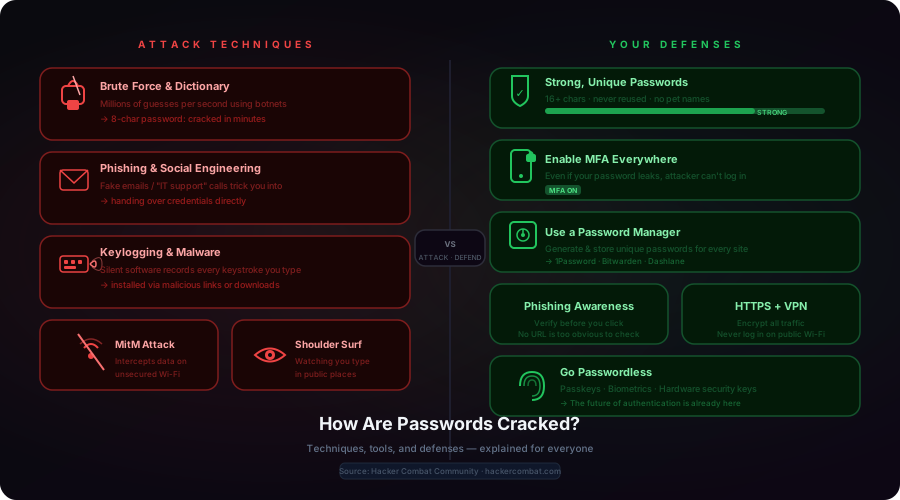
One cloud cost category that rarely appears in optimisation guides: the cost of a breach. Data breaches often originate from compromised credentials — a stolen password or a phished employee gives an attacker access to cloud management consoles, where they can spin up resources for crypto-mining or exfiltrate data. Understanding how attackers crack passwords and gain unauthorised access is the cheapest cloud cost optimisation measure you can take. A single compromised cloud account can generate tens of thousands of dollars in rogue compute charges overnight.
Cloud cost strategy also sits at the heart of broader digital transformation decisions. The organisations that transform successfully build financial discipline into their cloud architecture from day one — not as a retrofit.
Conclusion
Cloud cost optimisation is not a one-time project. It is an ongoing practice. Cloud environments change constantly — new services are added, old ones are forgotten, usage patterns shift. Without regular attention, costs will creep back up.
But the good news is that the fundamentals are straightforward. Right-size your resources. Commit to Reserved Instances for stable workloads. Find and eliminate idle resources. Use storage tiering. Set up monitoring and alerts. Tag everything. And build a culture where cost awareness is part of how your team works.
If you apply even half of these strategies consistently, you will see a meaningful reduction in your cloud bill — and you will have the visibility and control to keep it under control going forward.
At AGEideas, we help companies design and optimise their cloud infrastructure for both performance and cost. If your cloud bill is higher than it should be, or if you are planning a move to the cloud and want to do it right from the start, we would love to help.
Related Articles